TJCTF 2026: Forensics - Skeleton Writeup
Table of Contents
TJCTF - Forensics/Skeleton Writeup
Challenge Information
- Category: Forensics
- Challenge Name: Skeleton
- Provided File:
hash.txt - Flag format:
tjctf{}
Description
The challenge gives a zip2john hash for a password-protected ZIP archive containing flag.png, but the actual ZIP file is not provided.
The goal is to recover the image by exploiting the ZIP legacy encryption metadata exposed in the hash.
1. Initial Analysis
The provided line begins with the PKZIP legacy hash format:
flag.zip/flag.png:$pkzip2$1*1*2*0*12c*120*c8a6617a*0*26*0*12c*c8a6*81bd*36bee6...*$/pkzip2$:flag.png:flag.zip::flag.zip
Key observations:
- The hash is a
$pkzip2$hash produced byzip2john. - The fourth field is
0, which indicates the stored compression method (no compression). - The filename is
flag.png, so the payload is a PNG image.
The stored compression method is the crucial clue: the ZIP archive did not compress the file, so the encrypted data is the raw PNG bytes.
2. Why Stored Compression Matters
PKZIP legacy encryption uses a stream cipher where each plaintext byte is XORed with a keystream byte derived from three internal keys.
When the file is stored (uncompressed), the ciphertext corresponds directly to the original file bytes.
That means if we know some bytes of the plaintext, we can recover the internal encryption state without ever cracking the password.
3. Known-Plaintext Attack
PNG files start with a fixed, known 16-byte prefix:
89 50 4E 47 0D 0A 1A 0A 00 00 00 0D 49 48 44 52
This gives us enough known plaintext to launch a Known-Plaintext Attack (KPA) against the PKZIP stream cipher.
Extracting the ciphertext from the hash
The ciphertext appears in the hash data, after the metadata fields and before the closing $/pkzip2$ marker.
Once extracted and converted from hex, the ciphertext becomes the encrypted PNG payload.
4. Preparing the attack files
Create two binary files:
cipher.bin— the raw encrypted bytes extracted from the hash.plain.bin— the 16-byte PNG signature.
Example Python preparation script:
cipher_hex = "36bee62e49e2b2c41f6260bdc2e5fdd8cabd38956eb51f1d8a48c8f6228fd7392a8c53f3199068e3017e11c65e32cd55ea33033ab8b2fb52c4f86373098af1732591290e5c99a2a74239243b67108f232def15a73aac1537e75a593abe81fb3a8b0338afeb00835c67f8a31896a5f73facd1f481fd5ebc8882b5b183819f9b71c89506b3ae7d17bc07ab187ece8413a88af072018ccdc8a2db425082cec0715fd5aa3b3c47bb4f5c93b397154eb2212ffd593d0e4e614d83dafba289710be2e538f4610e8cb53c025aa722bfe832ec4d6cbe33350c09b690c92560292893f72c7e9894a50efaaf9635d64c86b053053b861a00e1717d7b2b963782ea4fe407008153d2d0564e2cbe3792eaa0dacd611b9eaf9d3e7d5b54ab63ae9906b62c830ef4b873d954c25c22e8a221c9"

cipher_bytes = bytes.fromhex(cipher_hex)

with open("cipher.bin", "wb") as f:
    f.write(cipher_bytes)

plain_bytes = bytes([0x89, 0x50, 0x4E, 0x47, 0x0D, 0x0A, 0x1A, 0x0A,
                     0x00, 0x00, 0x00, 0x0D, 0x49, 0x48, 0x44, 0x52])

with open("plain.bin", "wb") as f:
    f.write(plain_bytes)
5. Recovering the encryption keys
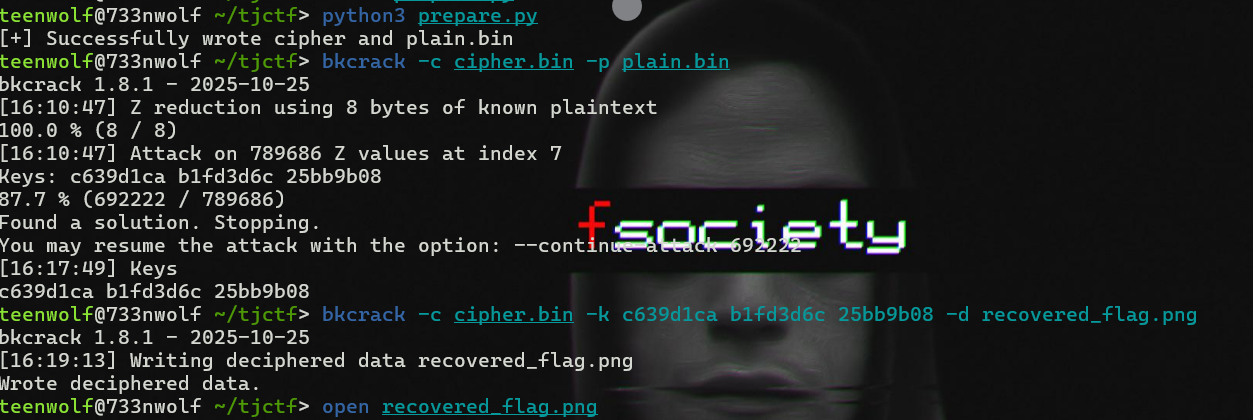
Use bkcrack to recover the PKZIP keys from the known plaintext:
bkcrack -c cipher.bin -p plain.bin
The attack will recover the three internal keys used by legacy PKZIP encryption.
6. Decrypting the image
Once the keys are recovered, decrypt the ciphertext back to PNG bytes:
bkcrack -c cipher.bin -k <key1> <key2> <key3> -d recovered_flag.png
Because the payload is uncompressed PNG data, the output file should be a valid image.

7. Notes on truncated payloads
zip2john hashes may truncate the embedded encrypted payload to save space.
If the extracted ciphertext is shorter than the full file, the recovered PNG may be missing a small footer such as the IEND chunk.
Most modern image viewers still render the image fine, so the flag can usually be read directly from the recovered picture.
8. Final Result
The final step is to open recovered_flag.png and read the flag from the displayed image.
Since the challenge is a PNG recovery problem, the flag is obtained by visually inspecting the recovered image.
Flag:
tjctf{...}
If the exact value is discovered from the image, replace the placeholder above with the recovered flag.